
XL Stats 1.0
Statistics and charts,
on your Atari.
Statistics for any Atari XL or XE with 64 KB: a table of 6 variables and 100 cases, descriptive statistics, a frequency table, four regression models and histogram, bar, pie and scatter charts. No internet needed.
Education section. XL Stats is educational software, not part of the XL Office suite: it comes on its own disk and works by itself. It joins XL Globe, XL Math and XL Lingua in the Education section. Inspired by SDG, by Claudio Fernández Loquenz.
See it in action.
Every frame comes from XL Stats running on an Atari.
Describe
Everything about one variable.
Type your data in the table, or read it from an XL Calc sheet, and press ^D: count, sum, minimum, maximum, mean, median, mode, quartiles, variance, standard deviation, coefficient of variation, skewness and kurtosis, all at once.

Like a spreadsheet. Quartiles, skewness and kurtosis are computed the same way.
Frequency table. ^F groups the data in classes, with percentages and cumulative counts.
Sample and population. Both variances and both standard deviations.
Regression
Four models, one fitted curve.
Choose X and Y and XL Stats fits a linear, parabolic, exponential or power model: the equation with its numbers, r, R², F, the standard error and the sums of squares. ^E draws the points and the curve.

Linear and parabolic. Y = A + B·X and Y = A + B·X + C·X².
Exponential and power. Bacteria that double, a pendulum that swings.
Real precision. The results match a PC spreadsheet to 7 digits.
Charts
Patterns instead of colors.
Histogram, bars and pie chart drawn in 320 × 192 with patterns that can be told apart on any TV, and printed with Epson graphics, or as a PDF through FujiNet.

Histogram. The classes of the frequency table.
Bars and pie. One bar or slice for each different value, with the legend.
Print it. The table and the results as text, the chart as a picture.
Straight from the Atari.
Every screen below was taken from XL Stats running on an Atari.
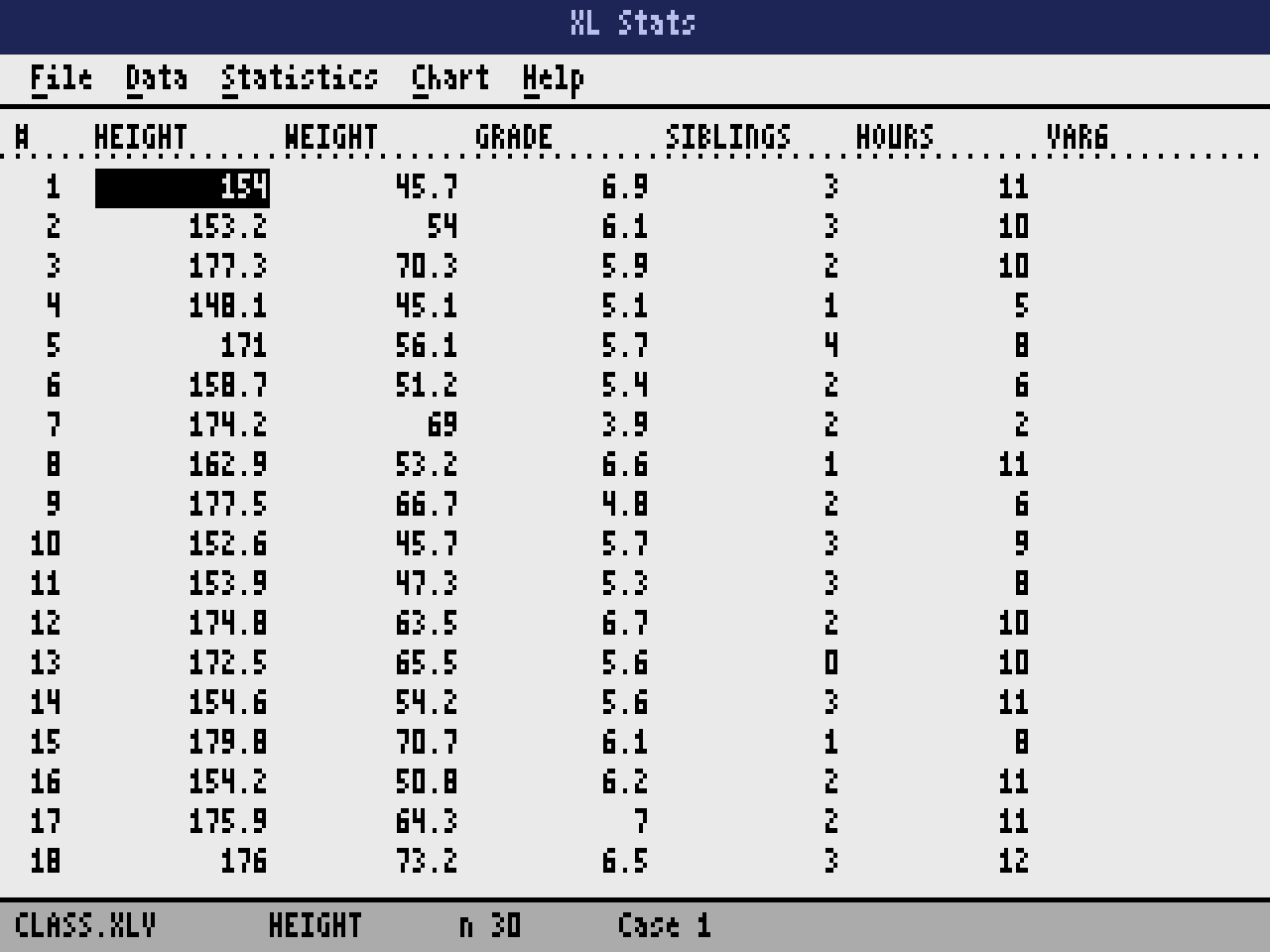
The table. 6 variables and up to 100 cases.
Describe. Eighteen results at once.

Frequencies. Classes, percentages and cumulative counts.

Regression. The equation, r, R² and F.

Histogram. The shape of the data.

Bars. One for each different value.
Pie chart. Patterns and the legend.

Exponential. Bacteria growing every hour.
What you need.
- Computer
- Any Atari XL or XE with 64 KB: 800XL, 1200XL, 65XE, 130XE, 800XE, XEGS and the 600XL expanded to 64 KB. NTSC or PAL.
- Controls
- The keyboard, and the joystick to move the pointer if you like.
- Disk
- One single-density disk that boots XL Stats by itself as drive 1, with sample tables and an XL Calc sheet.
- Printer
- Optional. Any Epson-compatible printer for the charts, or FujiNet to get a PDF.
- Languages
- English and Spanish, from Help > Language.
Inspired by SDG.
A special thank-you to the Atari programmer whose work gave birth to XL Stats.
- Claudio Fernández Loquenz
- Santiago de Chile. Atari user since 1979, when he had his first Atari 400, he wrote SDG (Statistical Data Graphics and Analysis) in Turbo-BASIC XL, which won third place in the ABBUC Software Contest 2008. He wrote to us with the idea of a statistics program for XL Office, and SDG showed the way: its tables, its descriptive statistics, its regression models and its charts. SDG on Atarimania.
XL Stats is a new program, written from scratch in 6502 assembler: SDG was the inspiration, not its code. Thank you, Claudio.
Take it home.
A small download: the boot disk with sample tables, the manual in English and Spanish, the keys on one page and the license.
Keyboard shortcutsPDF · 288 KB
Freeware by MyComuApp. Free to use and to share with anyone, as long as the files go unchanged.
All files
- XLStats-1.0.zipEverything in one package: the disk, the license and the manual549 KB
bfbf98c7796ab5f1ea4aad0a9b20a9e087f533180c037091ce49eacf9ba5c365 - XLStats-1.0.atrJust the disk, ready for FujiNet, SDrive or an emulator90 KB
ebff889f8657e405a0bd2c8fccf4099eec7eb734678c41e3af752e8d56eee51e - XLStats-Keys-EN.pdfThe keys of XL Stats on one page, to print288 KB
19153d8da13cd1ffdc69b39831be0365dffba1ba7aa126724ef4807c0ab93bec
Check your copy against the SHA-256 sums, also in SHA256SUMS.txt. On a Mac or Linux run shasum -a 256 -c SHA256SUMS.txt.
In Altirra
Pick an 800XL or a 130XE, open Boot Image in the File menu and choose XLStats-1.0.atr.
In atari800
Run atari800 -xl XLStats-1.0.atr. XL Stats starts by itself.
On a real Atari
Copy the disk image to a FujiNet, SIO2PC or SDrive as drive 1, or write it to a floppy, and turn on the computer.
Questions, answered.
Is XL Stats part of XL Office?
No. XL Stats is educational software with its own disk, in the Education section of this site: you do not need XL Office to use it. It shares the look and the menus of XL Office, and it reads the sheets of XL Calc.
How much data can it hold?
6 variables and up to 100 cases each, enough for a class or for any sheet of XL Calc (63 rows of data at most). Bigger tables can go to a PC as CSV.
How precise is it?
It computes with the floating point of the Atari ROM (10 digits) and shows 8. The results match a PC spreadsheet to 7 digits or more; in the exponential and power models some figures have about 4, because of the ROM logarithms. The manual explains it.
How long does it take?
A few seconds: describing 30 values takes about 2 seconds and an exponential regression of 13 points about 4. The status bar says "Working..." meanwhile.