
XL Base 1.0
The database
your Atari never had.
Tables, forms and SQL queries on any Atari XL or XE with 64 KB. Keep your customers, your stock or your game collection, and ask it questions.
A separate product. XL Base comes on its own disk and works by itself: you do not need XL Office to use it.
See it running for real.
Every frame comes from XL Base running on an Atari 800XL: a table designed, filled in and asked with SQL. Turn the sound on.
Tables
Design it your way.
Name each field, pick its type and size, and mark the ones that cannot be left empty. XL Base checks every value as you type it.

Four types of field. Text, number, date and yes/no.
Up to 16 fields. And records of up to 255 bytes.
The disk is the database. Each table is a file, listed in the database window.
Your data
Rows, columns and forms.
Work in the datasheet, or switch to a form that shows one record per screen. Find any text, sort by any field and add records in the last row.

Find and sort. By text, number or date, in either order.
Opens on your PC. Export CSV for Excel, LibreOffice or Google Sheets.
Ready to print. A clean listing in columns on your printer.
SQL
Ask your data anything.
Write a query and press RETURN. The answer opens as a new table, ready to sort, export or print.
SELECT TITLE, YEAR FROM GAMES WHERE RATING >= 9 ORDER BY YEAR
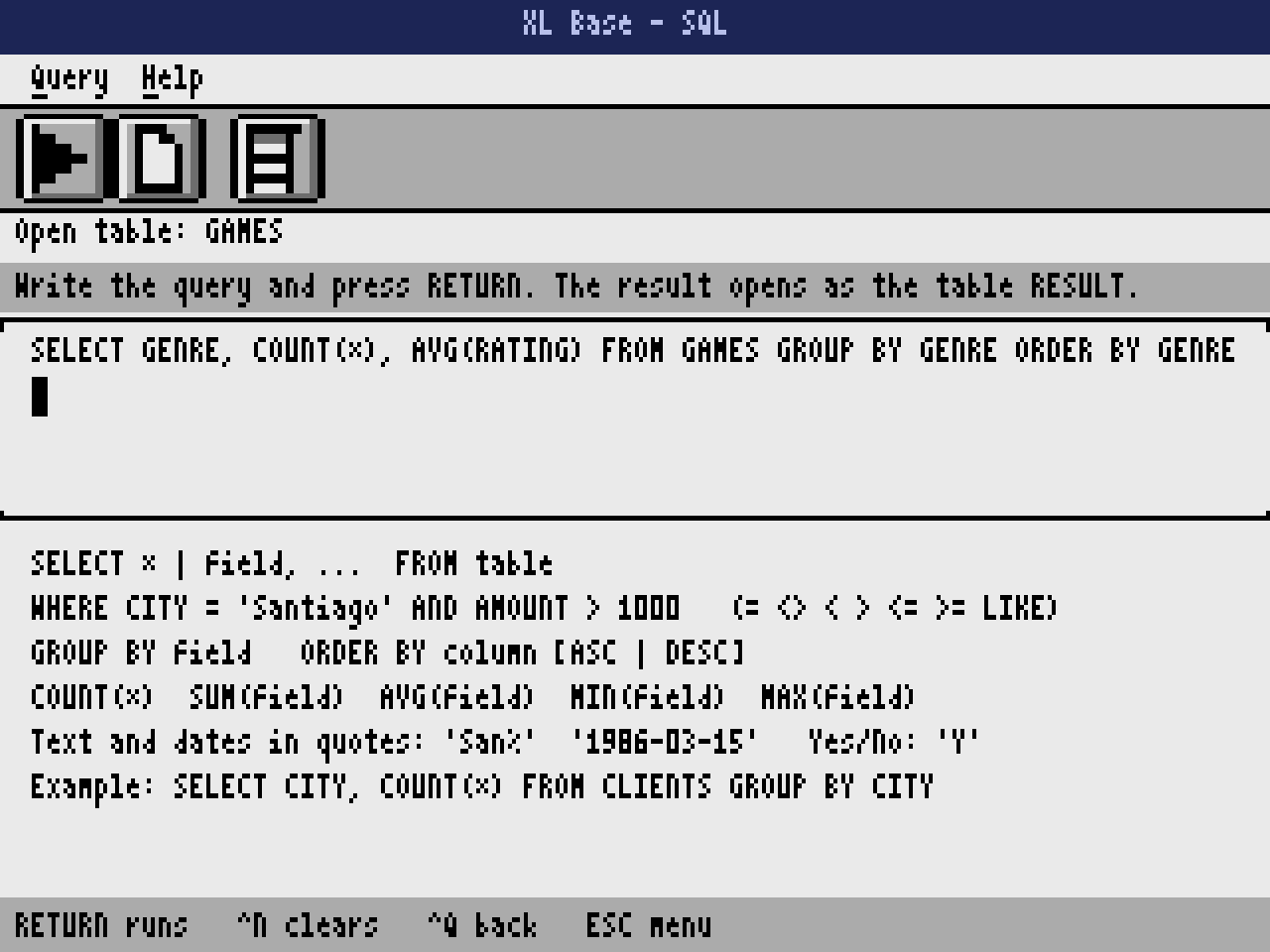
SELECT GENRE, COUNT(*), AVG(RATING) FROM GAMES GROUP BY GENRE
SELECT * FROM GAMES WHERE PUBLISHER = 'Epyx' AND OWNED = 'Y'
Filters that read well. = <> < > LIKE, with AND, OR and NOT.
Totals by group. COUNT, SUM, AVG, MIN and MAX with GROUP BY.
Remembers your query. The last one comes back next time.
Straight from the Atari.
Every screen below was taken from XL Base running, with the sample tables on the disk.

Database window. The tables on the disk, ready to open.
Datasheet. The sample table of classic Atari games.

Form view. One record per screen.
Design view. A new table, field by field.
SQL. A query with GROUP BY, ready to run.

Result. The answer opens as a new table.
What it takes.
- Computer
- Any Atari XL or XE with 64 KB: 800XL, 1200XL, 65XE, 130XE, 800XE, XEGS and the 600XL expanded to 64 KB. NTSC or PAL.
- Disk
- One disk with DOS 2.5, XL Base, the SQL module and two sample tables. About 35 KB stay free for your own tables.
- Tables
- Up to 16 fields and 255 bytes per record. The open table lives in memory: 7,936 bytes of records, for example 130 records of 60 bytes.
- SQL
- SELECT, FROM, WHERE (AND, OR, NOT, LIKE), GROUP BY with COUNT, SUM, AVG, MIN and MAX, and ORDER BY.
- Languages
- English and Spanish, chosen from the Help menu.
Take it home.
One small download: the bootable disk with two sample tables, the manual in English and Spanish, and the license.
Freeware. Free to use and to share with anyone, as long as the files go unchanged.
All files
- XLBase-1.0.zipEverything in one package: the disk, the guide, the license and the manual588 KB
8337f856af1e75f9d62be2576a9bb2c175c4d1acc80caee8b89f1f3018311211 - XLBase-1.0.atrThe disk on its own, ready for FujiNet, SDrive or an emulator90 KB
bf38341c8e2c8bb1e3f874e713c0402db1f91f06c877fe471c27af97b9bdce2d - XLBase-Keys-EN.pdfKeyboard shortcuts on one page, for printing317 KB
d6ae5df6cfbf085cfaa55bc41da54d5117213ef40b084378009fd70c4c27bb20
Check your copy against the SHA-256 sums, also in SHA256SUMS.txt. On a Mac or Linux run shasum -a 256 -c SHA256SUMS.txt.
In Altirra
Set the machine to an 800XL or a 130XE, open Boot Image from the File menu and choose XLBase-1.0.atr.
In atari800
Run atari800 -xl XLBase-1.0.atr. The numeric keypad works as the joystick.
On a real Atari
Copy the disk image to a FujiNet, SIO2PC or SDrive, or write it to a floppy, and switch the computer on.
Questions, answered.
Do I need XL Office?
No. XL Base is a separate product with its own disk. It shares the look and the keys of XL Office, so if you know one you know the other, but each one works on its own.
How big can a table be?
The open table lives in the Atari's memory: 7,936 bytes of records, for example 130 records of 60 bytes. A disk holds as many tables as fit on it.
Can I use my data on a PC?
Yes. Press CTRL and X to export any table, or the result of a query, as a CSV file that opens in Excel, LibreOffice or Google Sheets.
How much SQL does it understand?
The part people use every day: SELECT, WHERE with AND, OR, NOT and LIKE, GROUP BY with COUNT, SUM, AVG, MIN and MAX, and ORDER BY. The manual has examples for the sample tables.