XL Office 1.0 for Atari 8-bit computers

The office your Atari
never had.

A word processor, a spreadsheet, a presentation program and a database for every Atari 8-bit computer of the XL and XE line. Free, in English and Spanish.

Download free
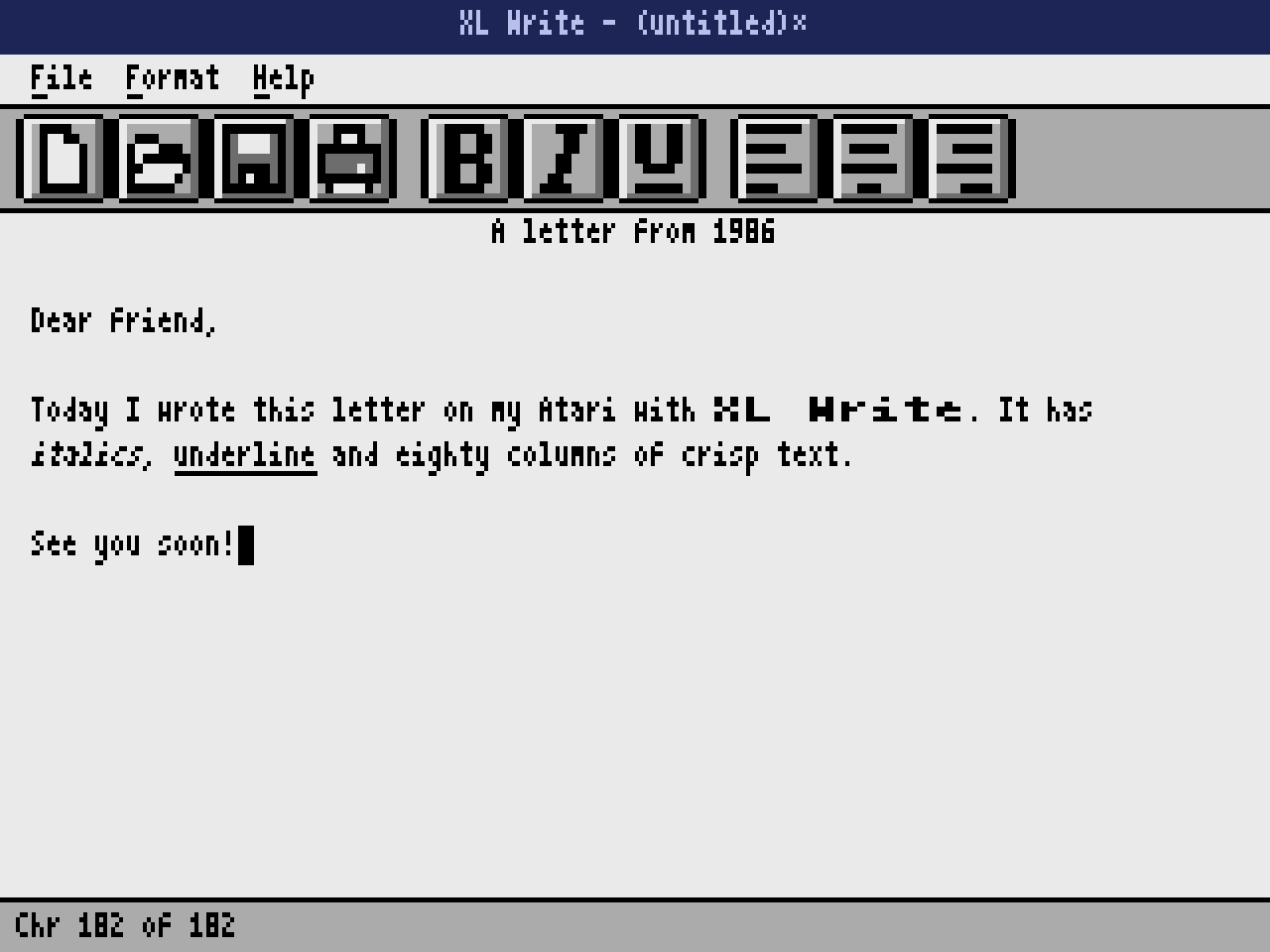
XL Write showing a letter with bold, italics and underline

Three programs on a single floppy disk. Sixty four kilobytes of memory, and every one of them put to work.

Atari 8-bit

Made for the Atari 8-bit family

XL Office runs on every Atari 8-bit computer of the XL and XE line with 64 KB of memory, in NTSC and PAL. If yours is one of these, it is ready.

Tap any computer to see it up close.

The original Atari 400 and 800 are not supported: they use a different operating system and lack the XL memory banking.

Photos from Wikimedia Commons by Evan-Amos (CC BY-SA 3.0), Rept0n1x (CC BY-SA 3.0), Bilby (CC BY 3.0) and Raimond Spekking and Schnurri (CC BY-SA 4.0).

XL Write

Words, in eighty columns.

Write letters, reports and stories with automatic word wrap, bold, italics and underline right in the text, and accents one key away.

XL Write showing a letter with bold, italics and underline

Up to 8 KB per document. Roughly four typed pages, saved as .XLW.

Opens on your PC. Export plain text with accents intact.

Ready to print. Works with any printer your Atari knows.

XL Calc

Numbers that always add up.

Sixteen columns, sixty four rows and formulas that recalculate while you type. The arithmetic comes from the Atari’s own floating point ROM, so the cents land where they should.

XL Calc with a home budget, formulas and formats

Real formulas. SUM, AVG, MIN and MAX, with references and parentheses.

Proper formats. Currency, percent, thousands and two decimals.

Friends with Excel. Export CSV and keep going on any modern spreadsheet.

XL Show

Presentations with a glow.

Smooth color gradients that the Atari paints one scan line at a time, titles, bullet points, bar charts and shapes. Then the whole screen is yours.

XL Show presenting a slide with a bar chart

Ten slides, one file. Saved as .XLP and ready to reopen.

Charts in one line. Type a few numbers and the bars appear.

Full screen. Present with the keyboard or the joystick.

See it running for real.

Every frame comes from the program running on an Atari 800XL. Turn the sound on.

Small machine. Serious work.

64 KB

is all the memory it asks for.

80

columns of crisp text on screen.

6

machine setups tested on every release.

2

languages, English and Spanish.

Written in 6502 assembly. Works with the 1200XL, 800XL, 65XE, 130XE, 800XE, XEGS and the 600XL with 64 KB, in NTSC and PAL.

XL Base

New

XL Base: a database for your Atari.

Our second product, on its own disk: tables, forms and SQL queries for any Atari XL or XE.

Discover XL Base

What’s new.

Every version, in plain words.

XL Base 1.0

A new product, on its own disk

New
  • A database for your Atari. Tables with text, number, date and yes/no fields, and required fields.
  • Datasheet and form. Add, edit and delete records; find any text and sort by any field.
  • SQL queries. SELECT, WHERE, LIKE, GROUP BY with COUNT, SUM, AVG, MIN and MAX, and ORDER BY.
  • Export and print. CSV for your PC and listings in columns on your printer.
  • Two sample tables. Classic Atari games and customers, ready to try on the disk.
  • A separate product. It works on its own; you do not need XL Office. More about XL Base.

XL Office 1.0

First release

Current
  • Three programs and a start menu. XL Write, XL Calc and XL Show on a single disk.
  • English and Spanish. Choose the language once and every program follows.
  • Export for the PC. Plain text with accents and CSV for any modern spreadsheet.
  • Charts and gradients. Bar charts and smooth color backgrounds in XL Show.
  • Samples to try. A letter, a budget and a presentation ready on the data disk.
  • Tested on six setups. 800XL and 130XE, NTSC and PAL, with and without BASIC.

Ready when you are.

One small download with a bootable disk, a data disk with sample documents and the full manual.

XL Office 1.0

43 KB zip file with two disk images and the manual in English and Spanish

Download free

XL Base 1.0

588 KB zip file with the disk image, the manual and the keyboard shortcuts

The database, a separate product on its own disk. More about XL Base

Download free

Try a sample. In XL Write press CTRL O and type D2:LETTER. In XL Calc open D2:BUDGET and in XL Show D2:SALES.

Freeware. Free to use and to share with anyone, as long as the files go unchanged. Read the license.

All files
  • XLOffice-1.0.zipEverything in one package: both disks, the guide, the license and the manual
    43 KB8baa9c4cb27e7f1b444977f08293272f59f000be521942981816e0aef6a54ef2
  • XLOffice-1.0.atrProgram disk on its own, ready for FujiNet, SDrive or an emulator
    90 KB8527a3e38226aaf396bc8733030506ff561c4fb829fcf5f809c2a77fa74eeed3
  • XLOffice-Data.atrData disk with the sample letter, budget and presentation
    90 KBd0cfe285c060c9167f1ab2c0a32f1a162118b6b0096f15cb74a28f11dbc3f835
  • XLBase-1.0.zipXL Base in one package: its disk, guide, license and manual
    588 KB8337f856af1e75f9d62be2576a9bb2c175c4d1acc80caee8b89f1f3018311211
  • XLBase-1.0.atrXL Base: its disk on its own
    90 KBbf38341c8e2c8bb1e3f874e713c0402db1f91f06c877fe471c27af97b9bdce2d
  • XLOffice-Manual-EN.pdfFull manual, with screenshots
    1.6 MB07b3633373326282f3e78f319e76982ef8c2019cc45a7efbb99471b2044a1b72
  • XLOffice-Keys-EN.pdfKeyboard shortcuts on one page, for printing
    344 KB0a60ba141dc17d27a77b390dad915407c1822250b93b066521a8e302443bed4f
  • XLBase-Keys-EN.pdfXL Base: keyboard shortcuts on one page
    317 KBd6ae5df6cfbf085cfaa55bc41da54d5117213ef40b084378009fd70c4c27bb20
  • LICENSE.txtFreeware license
    3 KB22929275bc7d1d9f3f65ffffddd16ac33c70bb9990dac479da43059be053eb9b

Check your copy against the SHA-256 sums, also in SHA256SUMS.txt. On a Mac or Linux run shasum -a 256 -c SHA256SUMS.txt.

In Altirra

Set the machine to an 800XL or a 130XE, open Boot Image from the File menu and choose XLOffice-1.0.atr. The start menu appears in a second.

In atari800

Run atari800 -xl XLOffice-1.0.atr. The numeric keypad works as the joystick and the zero key fires.

On a real Atari

Copy the disk image to a FujiNet, SIO2PC or SDrive, or write it to a floppy, and switch the computer on. No need to hold OPTION.

Questions, answered.

The things people ask before switching on their Atari.

Does it run on a real Atari?

Yes. Any Atari XL or XE with 64 KB: the 1200XL, 800XL, 65XE, 130XE, 800XE and XEGS, and the 600XL expanded to 64 KB, in NTSC and PAL. Copy the disk image to a FujiNet, SIO2PC or SDrive, or write it to a floppy, and switch the computer on.

What do I need to try it on my computer?

An Atari emulator. Altirra runs on Windows and comes with its own operating system ROM, so it works right away. On Mac and Linux, atari800 does the job with the XL operating system ROM.

Where are my documents saved?

On a floppy disk. The download includes a data disk, XLOffice-Data.atr, with a sample letter, budget and presentation to try right away. Mount it as drive 2 and open or save with names such as D2:LETTER.

Can I open my work on a PC?

Yes. Press CTRL and X to export: documents and slide outlines become plain text with accents intact, and spreadsheets become CSV files that open in Excel, LibreOffice or Google Sheets.

Do I need a mouse?

No. Everything works from the keyboard, and the joystick in port 1 moves the pointer and clicks. Support for Atari ST and Amiga mice is one of the ideas for a future version.

Does the 130XE use its extra 128 KB?

XL Office is built for 64 KB so it runs the same on every XL and XE. The 130XE works perfectly, it just keeps its extra memory free.

Which DOS does it use?

The boot disk comes with DOS 2.5 and is tested with it. XL Office uses only the standard operating system routines, so other compatible DOS versions should work too, although they have not been tested yet.

Does it cost anything?

No. XL Office is freeware: free to download, use and share, as long as the files go unchanged. The details are in the license.

I found a bug or I have an idea. Where do I send it?

Write to contacto@mycomuapp.com. Every message is read, and the best ideas end up in the next version.

What is XL Base?

Our database for Atari XL and XE computers: tables, forms, find, sort and SQL queries. It is a separate product with its own disk and works without XL Office. See XL Base.

Press kit.

Writing about XL Office or XL Base for a forum, a blog or a retro magazine? Everything you need is in one download.

  • Logo in SVG and PNG, transparent and on dark.
  • Real screens in English and Spanish, up to 2560x1920.
  • The videos of XL Office and XL Base, with sound.
  • Press texts for both products, in English and Spanish.
Download press kit

9.7 MB zip file

Let’s talk.

Questions, bugs, ideas or just a hello from a fellow Atari fan.

Write to us