
XL Browser 1.0
The web,
in 80 columns.
Browse the web from any Atari XL or XE: type an address or a few words, choose links with TAB or the joystick, and read the page as clean text. The web comes through FujiNet, secure sites included.
A separate product. XL Browser comes on its own disk and works by itself: you do not need XL Office to use it.
See it browse.
Every frame comes from XL Browser running on an Atari 800XL: the home page on the disk, the XL Office website typed in the address bar, a link followed and a bookmark kept.
Browse
A real browser, made of text.
An address bar, back and forward, reload and home, as in any browser. XL Browser reads the page as it arrives and turns it into 80 columns: headings in bold, lists, quotes, simple tables and underlined links.

Links your way. TAB or the arrows to choose, RETURN to follow, or a joystick click.
Pages of any size. Long pages arrive in parts: ^N shows the next one.
Accents and symbols. UTF-8, Latin-1 and HTML entities.
Search
Type words, find the web.
Write a few words in the address bar and XL Browser searches them in FrogFind, a search engine made for old computers. A heavy modern page? ^W opens it through FrogFind with only its text.

HTTPS through FujiNet. FujiNet makes the secure connection; the Atari reads the page.
Relative links. ../, / and // work as in any browser.
Clear errors. What went wrong, in English or Spanish, and a way back.
Keep
Bookmarks, find, save, print.
^D keeps the page in your bookmarks, a page on the disk that also opens on a PC. ^F finds words, ^S saves the page as .HTM and ^P prints its text. And it opens any .HTM file from the disk.

History. The last eight pages, back and forward.
Your own pages. Write HTML on a PC and read it on the Atari.
Tested online. Its tests load real pages over HTTPS through FujiNet-PC.
Straight from the Atari.
Every screen below was taken from XL Browser running, with the pages of the disk and the real pages of this website.
Home. The page on your disk.
The web. Through FujiNet, in 80 columns.
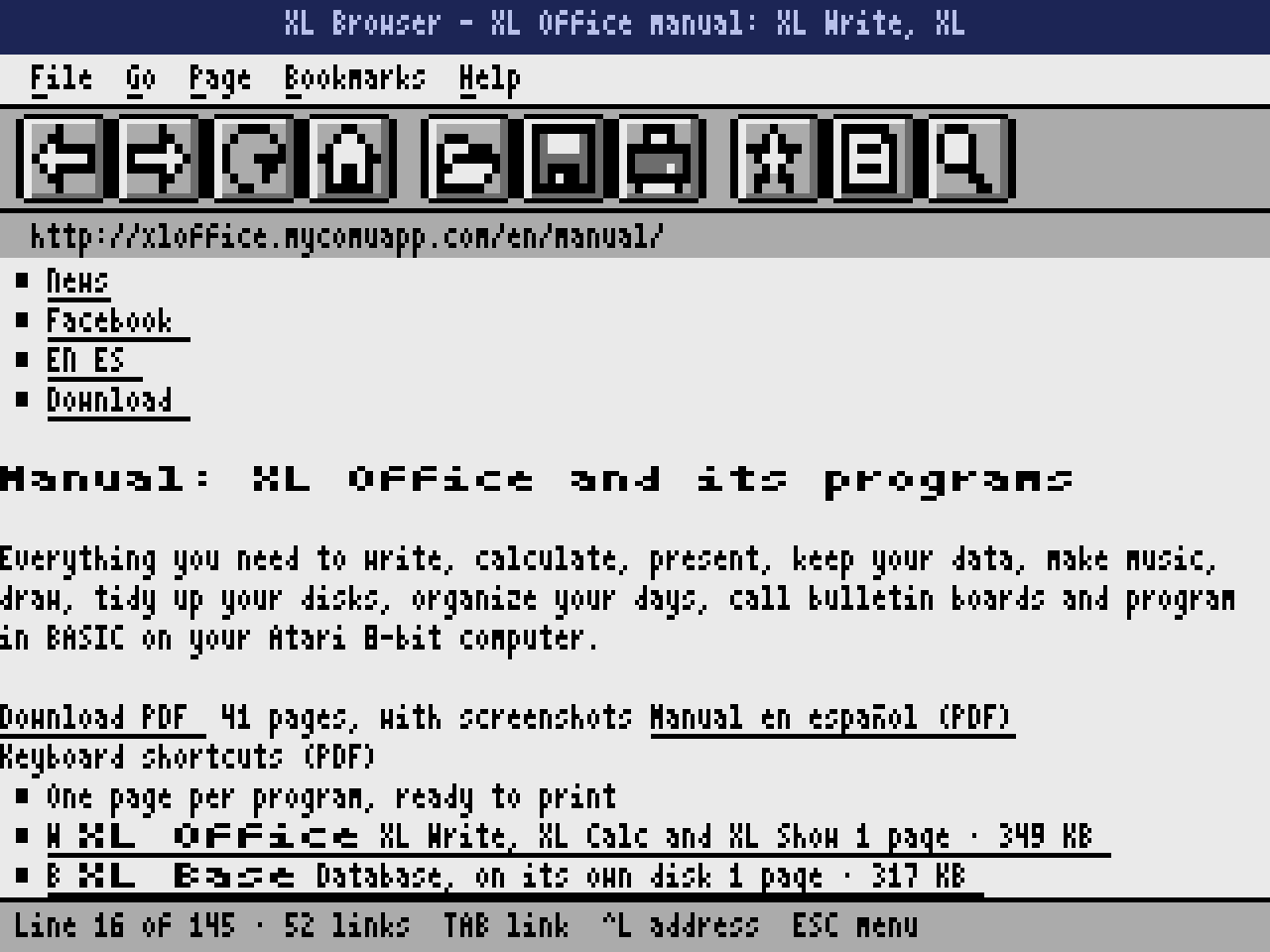
Links. Followed with RETURN or a click.
Bookmarks. ^D keeps, ^B shows.
What it takes.
- Computer
- Any Atari XL or XE with 64 KB: 800XL, 1200XL, 65XE, 130XE, 800XE, XEGS and the 600XL expanded to 64 KB. NTSC or PAL. BASIC off. It should also run on XL/XE with expanded memory, FPGA cores and emulators such as Altirra.
- The web
- A FujiNet connected to WiFi. Without it, the pages on the disk still work.
- What it shows
- Text, styles, lists, tables and links. No JavaScript, style sheets or pictures (an image shows its description).
- Emulators
- The disk pages work in any emulator. For the web, FujiNet-PC through NetSIO with atari800: see the guide in the manual.
- Languages
- English and Spanish, chosen from the Help menu.
Take it home.
One small download: the bootable disk with its home page and three more pages, the manual in English and Spanish, the keyboard shortcuts and the license.
Freeware. Free to use and to share with anyone, as long as the files go unchanged.
All files
- XLBrowser-1.0.zipEverything in one package: the disk, the guide, the license and the manual3.7 MB
abd8c620b6729f8d2f3d98868d19166a1e2088090bb8df387805a3facad9d895 - XLBrowser-1.0.atrThe disk on its own, ready for FujiNet, SDrive or an emulator90 KB
b149584ac86c0aa3d8533730550987e605aff91438572beedbeda112e6444404 - XLBrowser-Keys-EN.pdfKeyboard shortcuts on one page, for printing288 KB
2459d386a4acec5f745b22a2e8e8c2a8d9da00682cab4927a2a3a694e89a9567 - XLBrowser-FujiNet-EN.pdfGuide: FujiNet with an emulator, step by step (also in the manual)2.2 MB
f91124bad36fbf99c32d90e00b580648752099269ee92bbe2f82941e0f7158a4
Check your copy against the SHA-256 sums, also in SHA256SUMS.txt. On a Mac or Linux run shasum -a 256 -c SHA256SUMS.txt.
In Altirra
Choose an 800XL or a 130XE, open Boot Image from the File menu and choose XLBrowser-1.0.atr. The disk pages work; for the web, use atari800 with FujiNet-PC.
In atari800
Run atari800 -xl -nobasic XLBrowser-1.0.atr. For the web, start FujiNet-PC and run atari800 -xl -nobasic -netsio -nopatch: the manual has the step-by-step guide.
On a real Atari
Copy the disk image to the FujiNet SD card or a TNFS server, mount it as drive 1 and switch the computer on.
Questions, answered.
Do I need XL Office?
No. XL Browser is a separate product with its own disk. It shares the look and the menus of XL Office, so if you know one you know the other.
Do I need a FujiNet?
For the web, yes: FujiNet connects to WiFi and makes the connection, including secure https:// sites. The pages on the disk, your bookmarks and any .HTM file work without it.
Will modern sites work?
Their text and links, yes. XL Browser has no JavaScript, style sheets or pictures, so pages built only from scripts show little; press ^W to open them through FrogFind, which keeps only the text.
Was it tested on the real internet?
Yes. Besides the automatic tests, its online test loads real pages over HTTPS, follows links and searches in FrogFind through FujiNet-PC, which runs the same code as FujiNet. It has not been tested yet on a physical FujiNet.