
XL Paint 1.0
Paint on
your Atari.
Draw with the joystick on any Atari XL or XE with 64 KB: lines, shapes, fill and text in 4 colors, or shaded pictures in 16 tones. With zoom, mirror drawing and undo.
A separate product. XL Paint comes on its own disk and works by itself: you do not need XL Office to use it.
See it drawing for real.
Every frame comes from XL Paint running on an Atari 800XL: a house drawn with shapes and fill, a butterfly in mirror mode, the zoom and a shaded sphere in Photo mode. Turn the sound on.
Draw
All the tools you expect.
Pencil, brush, airbrush and eraser while you hold the button; lines, rectangles and ellipses with two clicks, following the pointer; fill and text with one.

Ten tools. In the toolbar, in the menu or with one letter.
Shapes that follow you. The line or ellipse moves with the pointer until the second click.
4 of 128 colors. Choose them, change their hue and brightness, and see them at once.
Photo mode
16 tones on an 8-bit.
Switch to Photo mode for 80x192 pictures in 16 tones of gray, sepia or any hue, thanks to the GTIA chip. Perfect for shaded drawings and photos converted on your PC.

Any hue. Gray, sepia, blue or green, for the whole picture.
Brighter, darker, more contrast. Retouch the whole picture in one step.
Photos from your PC. The xlpaint.py tool converts PNG or BMP with dithering.
Zoom and more
Pixel by pixel.
The zoom shows every pixel four times bigger for the fine work. Mirror drawing makes everything symmetrical, and undo takes back the last change.

4x zoom and full screen. Draw in both.
Mirror drawing. Faces, vases and patterns come out symmetrical.
Classic Atari formats. Opens and saves .MIC and .GR9 pictures from other programs.
Straight from the Atari.
Every screen below was taken from XL Paint running, with the sample pictures on the disk.
Drawing. Shapes, fill and text in four colors.

Sample. A sunset in four of the 128 Atari colors.
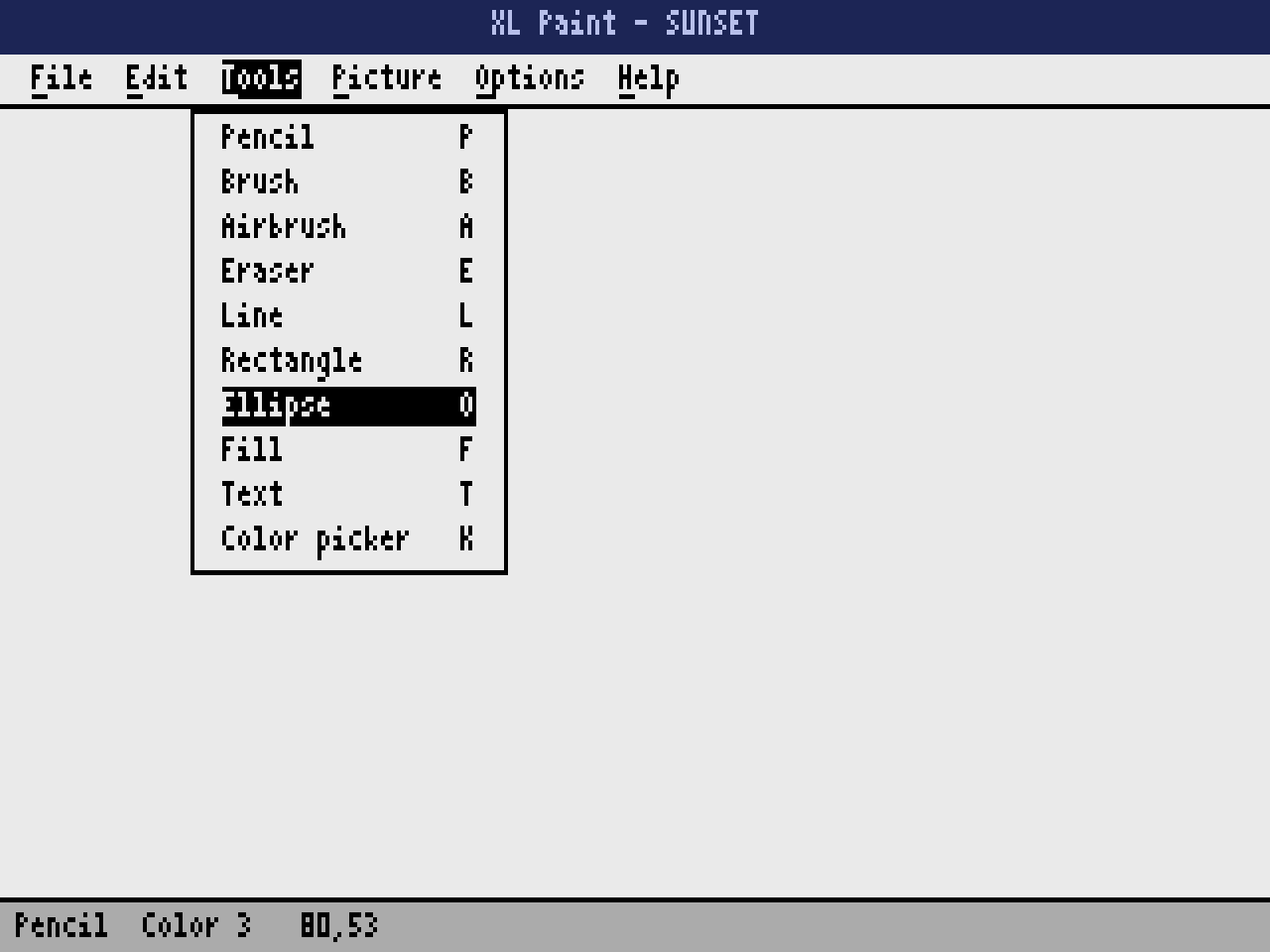
Tools. Each one with its letter.
Zoom. Every pixel four times bigger.
Photo mode. 16 tones with the GTIA chip.
What it takes.
- Computer
- Any Atari XL or XE with 64 KB: 800XL, 1200XL, 65XE, 130XE, 800XE, XEGS and the 600XL expanded to 64 KB. NTSC or PAL.
- Disk
- One disk with DOS 2.5, XL Paint and three sample pictures. Each picture takes about 62 sectors.
- Pictures
- Color: 160x192 in 4 colors of 128. Photo: 80x192 in 16 tones of one hue. Saved as .XLI, or as .MIC and .GR9.
- Controls
- Joystick in port 1 (hold the button to draw) or the keyboard alone: arrows move one pixel and RETURN clicks.
- Languages
- English and Spanish, chosen from the Help menu.
Take it home.
One small download: the bootable disk with three sample pictures, the manual in English and Spanish, the keyboard shortcuts, the xlpaint.py tool and the license.
Freeware. Free to use and to share with anyone, as long as the files go unchanged.
All files
- XLPaint-1.0.zipEverything in one package: the disk, the guide, the license, the manual and xlpaint.py573 KB
4ac9098e0ca747d9c169cceab1cf4921f98186741934d7c8169e1d509d78bd95 - XLPaint-1.0.atrThe disk on its own, ready for FujiNet, SDrive or an emulator90 KB
5cf07fefe57fd22106aa27044534c2a1c331482f1dcb9f68c304eb37511722ae - XLPaint-Keys-EN.pdfKeyboard shortcuts on one page, for printing307 KB
936e049a0d3990bfad193023d56570dc62d5e897910856eba18efebc483d0c80
Check your copy against the SHA-256 sums, also in SHA256SUMS.txt. On a Mac or Linux run shasum -a 256 -c SHA256SUMS.txt.
In Altirra
Set the machine to an 800XL or a 130XE, open Boot Image from the File menu and choose XLPaint-1.0.atr.
In atari800
Run atari800 -xl XLPaint-1.0.atr. The numeric keypad works as the joystick.
On a real Atari
Copy the disk image to a FujiNet, SIO2PC or SDrive, or write it to a floppy, and switch the computer on.
Questions, answered.
Do I need XL Office?
No. XL Paint is a separate product with its own disk. It shares the look and the menus of XL Office, so if you know one you know the other, but each works by itself.
Can I draw without a joystick?
Yes. The arrow keys move the pointer one pixel at a time and RETURN works as the button. The tools also have their own letters: P pencil, L line, R rectangle, O ellipse, F fill, T text.
Can I use my photos?
Yes. Run python3 xlpaint.py png2xli photo.png PHOTO.XLI --photo on your PC and copy the file to the disk. Without --photo you get a picture in the four Atari colors that fit it best.
Does it open pictures from other Atari programs?
Yes. File > Import opens .MIC pictures (160x192 in four colors) and .GR9 pictures (80x192 in 16 tones), the formats many drawing programs of the time used, and File > Export saves them.